GCP Training - Introduction and Overview
Contents
- Introduction
- What is Cloud Computing?
- Regions / Zones
- Billing
- Multi-Layered Security
- Storage Options
- Cloud Storage (GCS)
- Overview
- Storage Classes
- Integrated with
- Virtual Private Cloud (VPC) Networks
- Overview
- Managed Services
- GCP Managed Services For Compute
- Big Query
- Cloud SQL / Cloud Spanner
- Cloud PubSub
- Cloud Bigtable
- Cloud Dataflow
- Cloud Datalab
- Cloud Datastore
- Cloud Functions
- Cloud Machine Learning Platform
- Cloud Vision API
- Cloud Speech API
- Cloud Natural Language API
- Cloud translation API
- Cloud Video Intelligence API
- App Engine
- Overview
- Standard Environment
- Flexible Environment
- Comparison
- Comparison with Kubernetes
- Cloud Source Repositories
- Apigee and Cloud End Points
- Cloud Endpoints
- Apigee Edge
- Identity Access Management
- Overview
- Projects
- Roles
- Service Accounts
- Stackdriver
- Overview
- 6 Areas
- Deployment Manager
- Example
Introduction
What is Cloud Computing?
5 features of Cloud Computing
- On demand, self service.
- Broad network access.
- Resource pooling.
- Rapid elasticity.
- Measure service (PAYG).
Acronyms
- IaaS - Infrastructure as a service.
- PaaS - Platform as a service.
- SaaS - Software as a service.
Regions / Zones
- Zone is a deployment area (europe-west2-a).
- Regions contain many zones.
- Zone -> Zone < 5ms latency.
- Multi Region - stored redundantly in 2 locations >= 160km apart
Billing
Discount:
- Sustained use (auto when used > 25% a month).
- Committed use.
- Preemptable machines.
- Custom VMs.
Billing:
- Sub Hour Increments
- Budgets and alerts
- Billing exports
- Reports
- Quotas (Allocation eg > 5 networks or ...)
Multi-Layered Security
- Titan security chip.
- Machine cryptographic signatures.
- Disk HW encryption.
- Google Front End - check for correct certificates etc.
Storage Options
| . | Cloud Datastore | Bigtable | Cloud Storage | Cloud SQL | Cloud Spanner | BigQuery |
|---|---|---|---|---|---|---|
| Type | NoSQL Document | NoSQL wide column | Blob Store | Relational SQL for OLTP | Relational SQL for OLTP | Relational SQL for OLTP |
| Transaction | Yes | Single-row | No | Yes | Yes | No |
| Complex Queries | No | No | No | Yes | Yes | Yes |
| Capacity | TB+ | PB+ | PB+ | TB | PB | PB+ |
| Unit Size (max) | 1MB/entity | ~10MB/cell, ~100MB/row | 5MB/object | Determine by DB engine | 10,240MiB/row | 10MB/row |
| Best For | Semi-struct' data, app data, durable key-value data | "Flat" data, Heavy r/w, events, analytical data | Struct' and unstruct' binary or obj; data | web frameworks, existing apps | Large-scale DB apps (>~2TB) | Interactive querying, offline analytics |
| Use Cases | App Engine apps | AdTech, Fin' and IoT data | Images, media, backups | User cred's, customer orders | High I/O, global consistency | Data warehousing |
Cloud Storage (GCS)
Overview
- Binary large object storage
- No capacity management.
- Access via unique key (eg URL).
- Not a file system - object can be call files. Do not use as a file system.
- Immutable - never edit always replace with new.
- Organised by buckets.
- Globally unique name.
- Storage Class.
- Location (region / multi region).
- IAM policies or ACLs (Access Control Lists).
- Object versioning setting.
- Object lifecycle management rules (eg delete obj's older than 365 days, only keep 3 versions)
Storage Classes
- Multi-Regional - Most frequent access - avail SLA 99.95% - Content storage and delivery.
- Two locations > 160km.
- Main cost per GB per month.
.- Regional - Frequent access in a region - avail SLA 99.90% - In region analytics / transcoding. - Nearline - Access avg. > once a month - avail SLA 99.00% - backups, long tail content. - Cost includes per GB transferred.
- Coldline - Access avg. > once a year - avail SLA 99.00% - archiving, DR.
- Main cost per GB transferred.
- Min 90 days storage.
Integrated with
- Big Query - import and export tables.
- App engine - Object storage, logs and backups.
- Compute Engine - startup scripts, images and general objects.
- Cloud SQL - import and export tables.
Virtual Private Cloud (VPC) Networks
Overview
- Contained within in a project.
- Global Scope.
- Two VMs on same network and communicate using internal IP addresses even if they are in different regions.
- Two VMS in the same region but on different networks must use external IP addresses to communicate. Note - this does not mean they go over the internet but to Google edge routers.
- Subnets in regions and Subnets can span zones. Subnet are an IP address range.
- Have routing tables to forward traffic.
- Have a global firewalls.
- Have define rules based on metadata tags (eg tag all web servers as web and open all port 80 on these).
- VPC peering - allow two VPC to share traffic.
- Shared VPC.
VPC Types
Default
- Every project.
- One subnet per region.
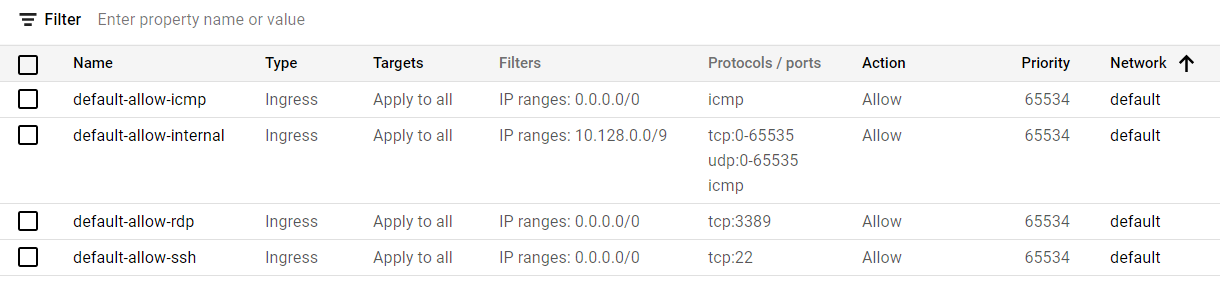
- Default firewalls.
Auto Mode
- Default Networking.
- One subnet per region.
- Regional IP allocation.
- Fixed /20 subnet per region.
- In the 10.128.0.0/9 cidr block.
- Expandable to /16.
Customer Mode
- No default subnets.
- Full control of IP ranges.
- Regional IP allocation.
- Expandable to any RFC 1918 size. (Note can expand without recreating, can not shrink).
External IP Addresses
Note: will get charged for these.
- External IP addresses map to internal IP addresses.
- FQDN - Fully Qualified Domain Name.
- External IP are unknown to the internal OS.
- Allow access from outside the Project.
Cloud DNS
- GCP DNS translating domain names to IP addresses.
Alias IP Ranges
- Can assign a range of IP addresses to a single VM. For example multiple services or containers could each use a different IP address.
Cloud Load Balancing
- Users get a single, global anycast IP address.
- Cross region load balancing.
- Traffic over Google backbone to closest point-of-presence.
- Traffic route based on backend load.
- Only healthy backends get traffic.
- No pre-warming required.
5 VPC Load-balancing Options
(For external traffic)
-
Global HTTP(S) - Layer 7 based on load, Can route different URLS to different backends.
-
Global SSL Proxy - Layer 4 of non-HTTPS SSL based on load. Supported on specific port numbers.
-
Global TCP Proxy - Layer 4 non-SSL TCP. Supported on specific port numbers.
-
Regional - Any traffic (TCP, UDP). anycast port number.
(For internal traffic)
- Regional Internal - Load balancer inside a VPC. Use for internal tiers of multi-tier apps . (eg between presentations and business layers).
Cloud DNS
- Create managed zones then add, edit, delete.
- Programmable using API.
Cloud CDN (content Delivery Network)
- Uses distributed edge caches to cache content close to users.
- Can use CDN interconnect to use of CDN.
Interconnect Options
-
VPN - Secure multi-Gbps over VPN tunnels.
-
Direct Peering - Private connection between you and Google. (No SLA).
-
Carrier Peering - Connect through largest partners network of service providers.
-
Dedicated Interconnect - Connect N x 10G transport circuits at Google POPs.
Route and Firewall Rules
Routes
- Map traffic to destination Networks.
- Are created when a subnet is created.
- Have Network and Instance tags. No instance tags then all instances can use it.
- Creates routing tables.
- Apply to traffic egressing a VM.
- Forward traffic to the most specific route.
- Destination is in CIDR notation.
- Enable VMs on the same NW to communicate.
Firewall Rules
- VPC networks functions as a distributed firewall.
- Are applied to NW as a whole.
- Connections allowed / disallowed and an instance level.
- Are stateful. Once traffic allow, subsequent traffic allowed.
- Implied deny all ingress allow all egress even if all firewall rules deleted.
Firewall Parameters
direction - inbound rules matched against ingress and outbound rules matched against egress
source or destination - for ingress source can be specified with IP address's, source tags or a source service account. For egress the destination can be specified with (see ingress).
protocol and port - Can restrict on protocol or protocol and port.
action - allow or deny packets.
priority - The order the rules are evaluated until the first matching rule is found.
Rule Assignment - rules can be assigned to all instances or specific instances.
With out any firewall there is an implied deny all ingress allow all egress rule.
GCP Firewall use case: Egress
Conditions: - Destination CIDR ranges. - Protocols. - Ports.
Action: - Allow: permit the matching egress connection. - Deny: block the matching egress connection.
GCP Firewall use case: Ingress
Protect against incoming connections.
Conditions: - Destination CIDR ranges. - Protocols. - Ports.
Action: - Allow: permit the matching ingress connection. - Deny: block the matching ingress connection.
Default Firewalls
Pricing
Ingress not charged unless a load balancer.
Egress not charged where: - To same zone (internal IP). - To Google product (YouTube, Maps etc). - To different GCP service (within same regions - some exceptions).
Egress is charged: - Between zones in the same region (per GB). - To the same zone (external IP) (per GB). - Between regions (per GB).
External Ip Addresses charges (as of 2021): - Static External IP assign but unused $0.010. - Static and Ephemeral on standard machines $0.004. - Static and Ephemeral on preemptible machines $0.002. - Static and Ephemeral attatched to forwarding rules: no charge.
Managed Services
We have:
IaaS (Infrastructure as a Service)
Cloud provides: VMs.
We are responsible for: Application Code and Runtime, Configuring load balancing, Auto scaling, OS upgrades and patches, Availability, etc..
PaaS (Platform as a Service)
Cloud provides: OS (incl. upgrades and patches), Application Runtime, Auto scaling, Availability & Load balancing etc..
we are responsible for: Configuration (of Application and Services), Application code.
Also:
- CaaS (Container as a Service) - containers instead of apps.
- FaaS (Function as a Service) - functions instead of apps.
- Databases - Relational & NoSQL (Amazon RDS, Google Cloud SQL, Azure SQL Database etc)
- Queues, AI, ML, Operations, etc..
Serverless
We don't need to worry about servers, OS, scaling, availability.
Typically pay for use - no use - no cost.
GCP Managed Services For Compute
| Service | Details | Category |
|---|---|---|
| Compute Engine | High-performance and general purpose VMs that scale globally. | IaaS |
| Google Kubernetes Engine | Orchestrate containerized microservices on Kubernetes. Needs advanced cluster configuration and monitoring. | CaaS |
| App Engine | Build highly scalable applications on a fully managed platform using open and familiar languages and tools. | PaaS (CaaS, Serverless) |
| Cloud Functions | Build event driven applications using simple, single-purpose functions. | FaaS, Serverless |
| Cloud Run | Develop and deploy highly scalable containerized applications. | CaaS (Serverless) |
Big Query
-
Fully managed data warehouse.
-
Petabyte scale, pay as you go model.
-
Can stream in 100,000 rows per second (11/2020).
-
Free monthly quota.
-
Can specify region data stored when creating dataset.
Cloud SQL / Cloud Spanner
- MySQL and PostgreSQL.
- Transactional.
- Benefits
- Auto replication and failover.
- Managed backups.
- Vertical and Horizontal scaling.
- Google security (table, temp files, backups).
- Cloud Spanner - Peta Bytes.
Cloud PubSub
- Realtime event management.
- Many to Many Async' messaging.
- Application make push / pull subscriptions to topics.
- Includes support for offline consumers.
- At least once delivery (so there is a small chance message delivered twice)
- 1 million messages per second.
- Subscriber can use push (push to them) or pull.
Cloud Bigtable
- Managed NoSQL, Wide Column, Sparsely Populated
- Single lookup key
- HBase compatible
- Stream Data In:
- Cloud Dataflow Streaming
- Spark Streaming
- Storm
Cloud Dataflow
- Unified programming model
- Managed service
- ETL.
- Batch computation
- Continuous computation
- Same pipeline can run over batch and streaming data.
- Can rebalance lagging work.
Cloud Datalab
Built on Jupyter. Interactive Python.
Runs in compute engine.
Cloud Datastore
- Horizontally scalable NoSQL DB
- Ideal for application backends (App Engine apps)
- Shading and replication automatically.
- Supports Transactions.
- Support SQL like Queries.
- Free daily quota.
- Can span App Engine and Compute Engine applications.
Cloud Functions
- Create single purpose function.
- Cloud Functions can trigger on events in Cloud Storage, Cloud Pub/Sub, or in HTTP call.
- Written in JS execute in managed Node.js env' on GCP.
Cloud Machine Learning Platform
- A range of machine learning APIs.
- Structured Data:
- Classification and regression
- Recommendation
- Anomaly detection
- Unstructured Data:
- Image and Video analytics
- Test analytics
Cloud Vision API
- Logo / label / text detection.
Cloud Speech API
- Audio to text (80 languages)
Cloud Natural Language API
- Reveal meaning of text.
- Extract information from news articles, blog posts etc.
- Entity recognition - eg people, places, ...
Cloud translation API
- Can translate between languages.
- Can detect the language used.
Cloud Video Intelligence API
- Annotate the content in videos. Can detect entities (nouns).
- Detect scene changes.
- Flag inappropriate content.
App Engine
Overview
- No need to focus in infrastructure. PaaS.
- Provides services such as: No SQL DB, In Memory Caching, Load Balancing, Health Checks, Logging
- Provides auto-scaling.
- 2 types of App Engine environments: Standard' and 'Flexible'.
Standard Environment
- Auto scaling.
- Free daily Quota.
- Runtimes for Java, Python, PHP and GO.
- SDKs allow local development and test before promotion to App Engine.
- Run's in a sandbox - no access to local file system. Can write to DB.
- 60s timeout.
- No 3rd party binaries.
Flexible Environment
- Runs App in a docker container on a compute engine.
Comparison
| Standard Environment | Flexible Environment | |
|---|---|---|
| Instance Startup | Milliseconds | Minutes |
| SSH Access | No | Yes (not default) |
| Write to local disk | No | Yes (ephemeral) |
| 3rd party binaries allowed | No | Yes |
| Network Access | Via App Eng' services | Y |
| Pricing model | After free daily allowance then pay per instance class. Auto shutdown | Pay for resource per hour. no auto shutdown |
Comparison with Kubernetes
| Kubernetes | App Engine Flexible | App Engine Standard | |
|---|---|---|---|
| Language Support | Any | Any | Java, Python, PHP, GO |
| Service Model | Hybrid | PaaS | PaaS |
| Primary Use Case | Container based workloads | Web / Mobile apps and container based workloads | Web / Mobile Apps |
Cloud Source Repositories
- GIT local to Project, protected with IAM.
Apigee and Cloud End Points
Two API management tools.
Cloud Endpoints
- Control access and validate calls with JWT and Google API keys
- Identify web, mobile users with Auth0 and Firebase Authentication.
- Generate client libraries.
Supports:
Runtime Env: App Engine Flexible Environments, K8s, Compute Engine.
Clients: Android, iOS, Javascript.
Apigee Edge
Helps secure and monetize APIs.
Used for making APIs available to customers and partners.
Identity Access Management
Overview
IAM - Who, What (can they do), Resource (on what)
Organisation Node
       |
    Folders
       |
    Projects
       |
   Resources
Projects
-
Project Id - Globally unique immutable but can be edited during generation.
-
Project Name - Mutable.
-
Project Number - Globally unique - auto generated.
Roles
3 types of Role:
- Primitive (viewer, editor, owner)
-
Affect all resources in a project.
-
Predefined
-
Customer
- Cannot assign these at a folder level (only Project or Org').
Service Accounts
Service accounts are both an identity and a resource
Stackdriver
Overview
Monitoring Logging and diagnostics.
6 Areas
Monitoring
- Platform, system and application metrics.
- Uptime / health checks.
- Dashboards and alerts.
Logging
- Platform, systems and application logs.
- Log search, view, filter and export.
- Log-based metrics
Trace
- latency reporting and sampling.
- Per-URL latency and statistics.
Error Reporting
- Error notifications.
- Error dashboard.
Debugger
- Debug applications.
Profiler
- Continuous profiling of CPU and memory consumption.
Deployment Manager
- Manage environment using a declarative rather than imperative approach.
- YAML or Python templates.
- Deployment Manager will then create the environments.
Example
File: mydepl.yaml
resources:
- name: my-vm
  type: compute.v1.instance
  properties:
    zone: us-central1-a
    machineType: zones/us-central1-a/machineTypes/n1-standard-1
    metadata:
      items:
      - key: startup-script
        value: "apt-get update; apt-get install nginx-light -y"
    disks:
    - deviceName: boot
      type: PERSISTENT
      boot: true
      autoDelete: true
      initializeParams:
        sourceImage: https://www.googleapis.com/compute/v1/projects/debian-cloud/global/images/debian-9-stretch-v20180806
    networkInterfaces:
    - network: https://www.googleapis.com/compute/v1/projects/qwiklabs-gcp-04-987e87eca026/global/networks/default
      accessConfigs:
      - name: External NAT
        type: ONE_TO_ONE_NAT
gcloud deployment-manager deployments create my-first-depl --config mydepl.yaml
gcloud deployment-manager deployments list
gcloud deployment-manager deployments update my-first-depl --config mydepl.yaml
To install the Monitoring and Logging agents:
curl -sSO https://dl.google.com/cloudagents/install-monitoring-agent.sh
sudo bash install-monitoring-agent.sh

curl -sSO https://dl.google.com/cloudagents/install-logging-agent.sh
sudo bash install-logging-agent.sh