Section 2 - GCE - Instance Groups and Load Balancing
Contents
- Instance Groups
- Managed Instance Groups
- Cloud Load Balancing
- Need to Configure
- Choosing a Load Balancer
- Cloud Load Balancing Features
- Load Balancing Across Multiple Instance Groups in Multiple regions
- Availability
- Highly Available Architecture:
- Scalability
- Live Migration
- Security
- Performance
- Resiliency
- Sustained Use Discounts
- Committed Use Discounts
- Preemptible VMs / Spot VMs
- Billing
Instance Groups
Two Types of Instance Groups:
Managed : Identical VMs created using an instance template: - Features: Auto scaling, auto healing and managed releases. - All instances must be same machine type.
Unmanaged : Different configuration for VMs in same group: - Does NOT offer auto scaling, auto healing & other services. - NOT Recommended unless you need different kinds of VMs.
Can be in a single Zone or over a Region.
Managed Instance Groups
- Maintain certain number of instances (If an instance crashes, MIG launches another instance).
- Detect application failures using health checks (Self Healing).
- Increase and decrease instances based on load (Auto Scaling).
- Add Load Balancer to distribute load.
- Create instances in multiple zones (regional MIGs).
- Regional MIGs provide higher availability compared to zonal MIGs.
- Release new application versions without downtime.
- Rolling updates: Release new version step by step (gradually). Update a percentage of instances to the new version at a time.
- Canary Deployment: Test new version with a group of instances before. releasing it across all instances.
Auto Scaling
Can configure:
- Minimum number of instances.
- Maximum number of instances.
- Autoscaling metrics:
- CPU Utilization target or Load Balancer Utilization target or Any other metric from Stack Driver.
- Cool-down period: How long to wait before looking at auto scaling metrics again? (to prevent frequent scaling up / down).
- Scale In Controls: Prevent a sudden drop in no of VM instances (Example: Don't scale in by more than 10% or 3 instances in 5 minutes).
Rolling Updates
- Replace instance template with a new template.
- Can replace instances (create new, delete old).
- Can restart instances (so instance will be temporarily unavailable).
- Can use canary testing (test 'n' instances and if good update all).
- Maximum surge: How many instances are added at any point in time? (how many temporary additional instances above the current number).
- Maximum unavailable: How many instances can be offline during the update? (set this to 0 for no reduction in capacity - therefore new instances added before current instances removed).
Cloud Load Balancing
Distributes user traffic across instances of an application in single region or multiple regions.
- Fully distributed, software defined managed service.
- Important Features:
- Health check - Route to healthy instances.
- Recover from failures.
- Auto Scaling.
- Global load balancing with single anycast IP (Also supports internal load balancing).
- Enables:
- High Availability.
- Auto Scaling.
-
Resiliency.
-
Load balancer can be:
- HTTP(s).
- TCP (TCP LB, SSL proxy, TCP proxy).
-
UDP (single region only).
-
Load balance can be:
- Internal.
-
External (external IP).
-
Can load balance based on:
- Instance Utilization.
- Request Rate (ie maximum requests per second per instance).
Need to Configure
- Backend - Group of endpoints that receive traffic from a Google Cloud load balancer (example: instance groups).
- Note can have multiple backends (multiple instance groups).
- Frontend - Specify an IP address, port and protocol. This IP address is the frontend IP for your clients requests.
- For SSL, a certificate must also be assigned.
- Host and path rules (For HTTP(S) Load Balancing) - Define rules redirecting the traffic to different backends:
- Based on path - xxx.com/a vs xxx.com/b
- Based on Host - a.xxx.com vs b.xxx.com
- Based on HTTP headers (Authorization header) and methods (POST, GET, etc).
- etc.
SSL/TLS Termination/Offloading
- Client to LB: HTTPS/TLS.
- LB to VM: HTTP/TCP.
LB is performing Termination/Offloading. This reduces load on the VM instances as they don't need to manage SSL.
Choosing a Load Balancer
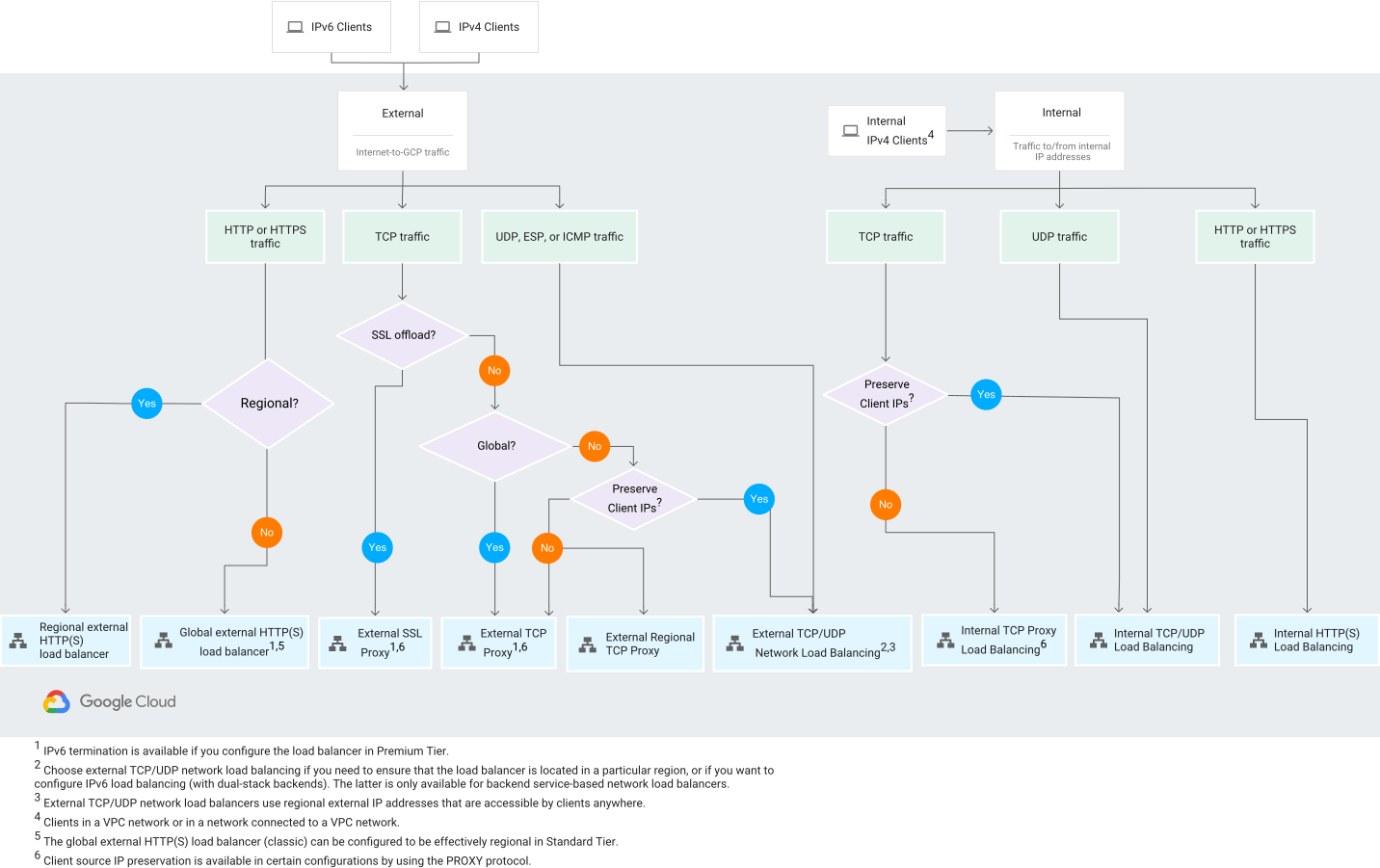
(https://cloud.google.com/load-balancing/images/choose-lb.svg)
Cloud Load Balancing Features
| Load Balancer | Traffic Type | Proxy/Pass-through | Dest' Ports |
|---|---|---|---|
| External HTTP(S) | Global, External, HTTP(S) | Proxy | HTTP 80/8080, HTTPS 443 |
| Internal HTTP(S) | Regional, Internal, HTTP(S) | Proxy | HTTP 80/8080, HTTPS 443 |
| SSL Proxy | Global, External, TCP with SSL offload | Proxy | Many |
| TCP Proxy | Global, External, TCP without SSL offload | Proxy | Many |
| External NW TCP/UDP | Regional, External, TCP/UDP | Pass-through | Any |
| Internal NW TCP/UDP | Regional, Internal, TCP/UDP | Pass-through | Any |
Load Balancing Across Multiple Instance Groups in Multiple regions
- Regional MIG can distribute instances in different zones of a single region (in the same project).
- HTTP(S) Load Balancing can distribute load to the multiple MIGs behind a single external IP address.
- User requests are redirected to the nearest region (Low latency).
- Load balancing sends traffic to healthy instances:
- If health check fails instances are restarted. (Ensure that health check from load balancer can reach the instances in an instance group (Firewall rules)).
- If all backends within a region are unhealthy, traffic is distributed to healthy backends in other regions.
- Note: Can contain preemptible instances.
Load Balancing Scenarios
- Backend Service - Group of backends or a bucket (Each Backend Service can have multiple backends in multiple regions).
- Backend - A Managed Instance Group.
- URL Maps - Route requests to backend services or backend buckets eg.
- URL /service-a maps to Backend Service A.
- URL /service-b maps to Backend Service B.
Scenario 1 - Multi Regional Microservice
- One Backend Service (for the Microservice).
- Multiple Backends (one for each MIG in each region).
- Single URL Map - to the Backend Service.
- Global routing - you to the nearest regional MIG.
- Note: Needs Premium Networking Tier (Standard tier only allows single region).
Scenario 2 - Multiple Microservices
- Multiple Backend Services (one per Microservice).
- multiple Backend (each Microservice can have multiple MIGs multiple regions).
- URL Map for each Microservice backend (e.g
URL /service-a).
Availability
- 99.99% - four 9's availability - 4.5 minutes downtime a month.
- 99.999% - 26 seconds downtime per month.
Highly Available Architecture:
- Multiple Regional Instance Groups for each Microservice.
- Distribute Load using a Global HTTPS Load Balancing.
- Configure Health Checks for Instance Group and Load Balancing.
- Enable Live Migration for VM instances.
Advantages: - Instances distributed across regions - even if a region is down, your app is available. - Global Load Balancing is highly available. - Health checks ensure auto healing.
Scalability
- Vertical Scaling - increase machine size.
- Horizontal Scaling - auto scale Managed Instance Group, distribute load using a Load Balancer.
Live Migration
- Running instance is migrated to another host in the same zone.
- Does NOT change any attributes or properties of the VM.
- SUPPORT for instances with local SSDs.
- NO SUPPORT for GPUs and preemptible instances.
Availability Policy: - On host maintenance: What should happen during periodic infrastructure maintenance? - Migrate (default): Migrate VM instance to other hardware. - Terminate: Stop the VM instance (required for VMs with GPU). - Automatic restart - Restart VM instances if they are terminated due to non-user-initiated reasons (maintenance event, hardware failure etc).
Security
- Use Firewall Rules to restrict traffic.
- Use Internal IP Addresses as much as possible.
- Use Sole-tenant nodes when you have regulatory needs.
- Create a hardened custom image to launch your VMs.
Performance
- Use GPUs to accelerate machine learning and data processing workloads.
- Use TPUs for massive matrix operations performed in your machine learning workloads.
- Prefer creating a hardened custom image to installing software at startup.
Resiliency
- Build Resilient Architectures (run VMs in MIG behind global load balancing).
- Have the right data available:
- Use Cloud Monitoring for monitoring.
- Install logging agent to send logs to Cloud Logging.
- Be prepared for the unexpected (and changes)
- Enable Live Migration and Automatic restart when available.
- Configure the right health checks.
- DR- Up to date image copied to multiple regions.
Sustained Use Discounts
- Automatic discounts for running VM instances for significant portion of the billing month.
- Example: If you use N1, N2 machine types for more than 25% of a month, you get a 20% to 50% discount on every incremental minute.
- Discount increases with usage.
- No action required on your part.
- Applicable for instances created by Google Kubernetes Engine and Compute Engine.
- Does NOT apply on certain machine types (eg. E2, A2) or instances created by App Engine flexible and Dataflow.
Committed Use Discounts
- For predictable requirements.
- 1 - 3 years.
- Up to 70% discount (certain machine types / GPUs).
- Applicable for instances created by Google Kubernetes Engine and Compute Engine.
- NOT applicable for instances created by App Engine flexible and Dataflow.
Preemptible VMs / Spot VMs
Preemptible VMs
- Up to 80% saving.
- Can be killed at anytime - Instances get 30 second warning.
- Maximum runtime - 24 hours.
Spot VMs
As per preemptible but with no maximum runtime of 24 hours.
Billing
- Billed by second (minimum 1 minute).
- Not billed when VM stopped (storage billed).
- Create budgets alerts.
- Use auto scaling to have optimal number of VMs running.